
Once your Reviewers.com campaign is live and Reviewers start claiming your offer, you'll fulfill orders, track your campaign's progress, and manage the reviews that come in. This article covers everything that happens after your campaign launches - from shipping products to using your collected video reviews.
Fulfilling Reviewers.com orders
When Reviewers join your campaign, they place an order on your Shopify store using a unique 100% discount code. These orders appear in your Shopify admin alongside your regular orders.
How to identify Reviewers.com orders: All campaign-related discount codes are prefixed with "RVS-". You can search or filter for this prefix in your Shopify orders to find them.
How to fulfill them: Process and ship these orders exactly as you would any other Shopify order. Use your standard fulfillment workflow - there's no separate system for Reviewers.com orders. Your usual shipping notifications and tracking updates will apply.
Tip: Make sure you have enough stock to cover your campaign items (5 or 10) plus your regular sales during the campaign window. If a product becomes unavailable, Reviewers won't be able to complete their orders.
Delivery and review request timing
After you ship the product, review request emails are sent based on the review request timing you selected during campaign creation. The review request can be sent 1-30 days after purchase, fulfillment, or delivery (depending on what you selected). If you don't customize the campaign review request timing, the default is for emails to be sent 14 days after fulfillment.
Note: To use delivery-based timing, Shopify must receive shipment status updates from your shipping carrier or tracking app. If delivery data isn't available, the system falls back to fulfillment-based timing.
Once the review request is sent, Reviewers.com automatically sends multiple reminder emails to Reviewers who haven't submitted their review yet. This helps reduce ghosting and keeps the review rate high.
Tracking your campaign status
You can monitor your campaign's progress from the Campaigns page. Click Manage campaign next to any campaign to see its details.
Campaign statuses
- Pending - Awaiting our team's review and approval
- Approved - Our team has approved your campaign and it will soon be sent to Reviewers
- Sent - Your campaign is live and has been shared with eligible Reviewers
- Completed - All samples were claimed or the 7-day window ended. Reviews should start coming in soon
- Rejected - Your campaign was not approved, or you canceled it
- Unpaid - Awaiting payment. Once paid, it moves to Pending
- Paused - You paused the campaign. New Reviewers can't join until you resume it
Reviewer statuses
Inside each campaign, you can see the status of individual Reviewers:
- Ordered - Reviewer joined the campaign and is waiting for their product
- Reviewed - Reviewer submitted their video review
- Canceled - The order was canceled or returned
Viewing your campaign settings
Campaigns can't be edited after creation, but you can revisit everything you configured at any time. Each campaign includes a Campaign overview tab with a read-only summary of the settings you selected when creating it.
To view a campaign's settings:
- In your Reviewers.com admin, go to your Campaigns page.
- Click Manage campaign next to the relevant campaign. This opens the campaign's Reviewers tab, which lists the Reviewers participating in your campaign and the status of their orders and reviews.
- Switch to the Campaign overview tab on the top left.
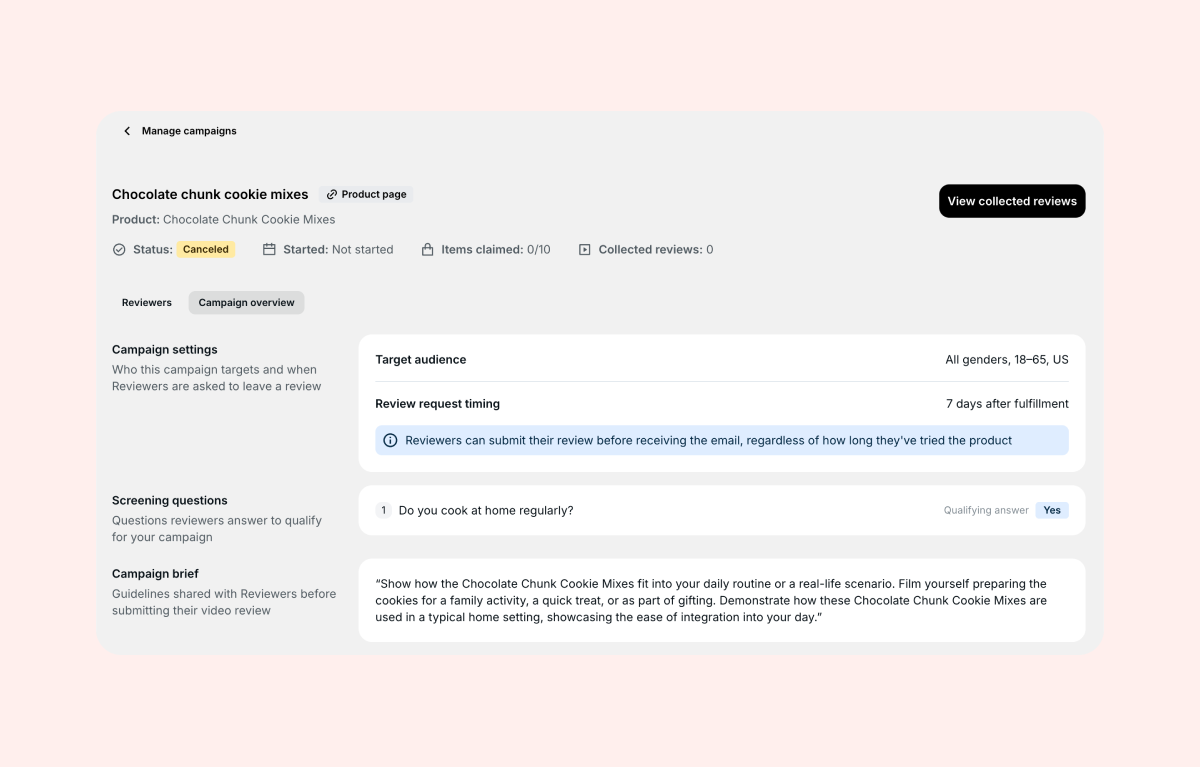
- Target audience - the age range and gender you selected for your Reviewers, and the campaign's location targeting (currently United States, since the Reviewers.com community is US-based)
- Review request timing - when the review request email is sent, based on the number of days after purchase, fulfillment, or delivery you selected, and whether Reviewers can submit a review before they receive the review request.
- Screening questions - each of your questions with its qualifying answer. This section appears only if you added screening questions
- Campaign brief - the brief you wrote for your Reviewers. This section appears only if you wrote a brief
When to expect reviews
The timeline for receiving reviews depends on several factors:
- Fulfillment time - How quickly you ship the order after it's placed
- Delivery time - How long shipping takes to reach the Reviewer
- Review request timing - According to your timing settings (1-30 days after the selected trigger)- especially if you toggled off "Allow Reviewers to submit a review before the request is sent," meaning Reviewers wouldn't be able to submit a review before your selected timing
- Reviewer turnaround - Reviewers record and submit their videos after trying the product
As a general guide, you can expect reviews to start coming in within 1-3 weeks after your campaign goes live, depending on your fulfillment speed and email timing settings. Faster fulfillment means faster reviews. From your Campaigns page, you can go into any ongoing campaign via the "Manage Campaign" button to watch and download the reviews as they come in on the Reviewers tab, track the details of all the campaign participants, and give us feedback about the reviews you received.
Note: The expected ghosting rate is 10-20%. Even with reminder emails and community accountability measures, some Reviewers won't complete their review after receiving the product. Those Reviewers will be permanently removed from the community.
Managing your collected reviews
Once Reviewers submit their video reviews and they pass our AI quality check, the reviews appear on the Manage reviews page in your Reviewers.com app. This page is your central hub for viewing and downloading the video reviews collected across all your campaigns.
From the Manage reviews page, you can:
- View all collected video reviews
- Filter reviews by rating, product, date, or campaign to narrow down your search results
- View the order data associated with any review
- Download individual videos
- Download reviews in bulk as a CSV - Export your reviews and video links to use in ads, social media, email campaigns, or to import into another platform
Reviewers.com is a review collection tool - it doesn't include on-site review display or widgets. To display your collected video reviews on your store, you can import them into a review app of your choice, or use them directly in your marketing channels.
If you're also using Loox
If you have the Loox app installed, your Reviewers.com reviews sync to your Loox account automatically. They appear alongside your other reviews in your Loox widgets and on the Loox Manage Reviews page. You can filter for them using Source > Reviewers.com.
Through Loox, you also get access to additional features for your Reviewers.com reviews, including auto-publish settings, the "Free product" transparency badge, and on-site display in your review widgets.
Exporting your reviews
You can download your collected reviews as a CSV directly from the Manage reviews page in the Reviewers.com app. The export includes review data and video links, so you can:
- Build a content library for your ads and social media
- Share videos with your marketing team or agency
- Import reviews into a reviews app for on-site display
- Back up your review content
Note: If you've uninstalled the app and need access to your review videos, contact our support team. We can export and send you a CSV with your reviews and video links.
Usage rights
You have full usage rights to every video review collected through Reviewers.com. There are no restrictions on where or how you use them - and the rights don't expire.
Here are some of the ways brands put their Reviewers.com video reviews to work:
- Paid ads - Use video reviews as creatives in Facebook, Instagram, TikTok, and YouTube ads
- Social media - Share reviews on your brand's social channels
- Email marketing - Include video review content in your email campaigns
- Product pages - Import reviews into a review app (like Loox) to display them on your store
- Google Shopping - Syndicate your reviews to Google Shopping listings (reviews meet FTC compliance standards)
Unlike influencer content, which often comes with restricted usage windows or platform-specific rights, Reviewers.com reviews are yours to use anywhere, anytime.
FAQs
Q: When will I start seeing reviews after my campaign goes live?
A: It depends on your fulfillment speed and review request timing, but most brands start seeing reviews within 1-3 weeks of their campaign going live.
Q: Where can I see the settings of a past campaign?
A: Go to your Campaigns page and click Manage campaign, then switch to the Campaign overview tab. It shows the target audience, review request timing, brief, and screening questions you set when creating the campaign. The tab is read-only - to run a campaign with different settings, create a new one.
Q: What if a Reviewer doesn't submit a review after receiving the product?
A: We send multiple automated reminder emails. Reviewers also can't join new campaigns until they submit their current review. The expected ghosting rate is 10-20%.
Q: Can I reject or remove a review I don't like?
A: All reviews are honest, unscripted, and FTC compliant - so you can't ask a Reviewer to change their opinion. You can download and choose which reviews to use in your marketing.
Q: How do I display Reviewers.com reviews on my store?
A: Reviewers.com focuses on review collection, not on-site display. You can export your reviews and import them into a reviews app of your choice. If you're using Loox, your reviews sync automatically and appear in your Loox widgets.
Q: Will these reviews be accepted in my Google Shopping review feed?
A: Yes. Reviewers.com reviews meet FTC guidelines and can be syndicated to your Google Shopping product listings. However, since Google Shopping doesn't support video reviews, only the text and video thumbnail will be synced to Google- the video itself will not appear on your Product Listings.
Q: Can I use the videos in my ads?
A: Yes. You have full usage rights to all collected videos - use them in paid ads, social posts, emails, or anywhere else.
Q: Do Reviewers share their reviews on social media?
A: Some Reviewers do share their reviews on their own social channels, but this is not required. The primary goal of the campaign is collecting video reviews for your brand.
Q: What if I use Klaviyo or Omnisend for my review request emails?
A: All Reviewers.com emails (review requests and reminders) are sent through Reviewers.com directly, not through your existing email marketing platform. This applies regardless of your email integration setup.
Q: Can I extend my campaign if not all items were claimed?
A: No, campaigns close after 7 days or once all items are claimed, whichever comes first. They can't be extended, but you can create a new campaign at any time.
Need help? If you have more questions, contact our support team at brands@reviewers.com - we're happy to help!